Scaling PostgreSQL with Kubernetes
Discover how to scale PostgreSQL with Kubernetes, exploring replication, partitioning, and sharding for improved performance and resilience

A Case for Vertical Scaling
If you have read articles or books on system design, you probably know the differences between vertical and horizontal scaling and the advantages of scaling horizontally. But before jumping straight into horizontal architectures, let's first consider when you should stick with vertical scaling:
-
Simplicity: A single-node database works right out of the box without the operational overhead of consensus, distributed transactions, or cross-node networking. (Tip: Use PGTune for quick config presets or visit postgresqlco.nf for detailed parameter tuning).
-
Straightforward Backup & Recovery: Point-in-time recovery (PITR) and database dumps are simpler because you don't need to coordinate state across multiple distributed nodes.
-
Zero Distributed Network Overhead: Local transactions and write-heavy workloads run at raw NVMe/SSD disk speed without network serialization latency.
-
Immediate Capacity Relief: Upgrading RAM, CPU, and disk throughput on a single instance is often the fastest, most reliable way to handle sudden traffic growth.
Prerequisites
Make sure you have the following CLI tools installed:
Note: Following this guide assumes a basic familiarity with Kubernetes concepts, Custom Resource Definitions (CRDs), and Helm.
Replication (High Availability & Read Scaling)
Replication involves maintaining synchronized copies of data across multiple database instances connected over the network. Here is why you should implement replication:
-
High Availability & Fault Tolerance: If the primary node crashes, an automated failover promotes a replica to primary with minimal downtime.
-
Read Scalability: Distribute read queries across multiple read replicas (ideal for read-heavy OLTP workloads).
-
Geographical Proximity: Serve read requests closer to end users.
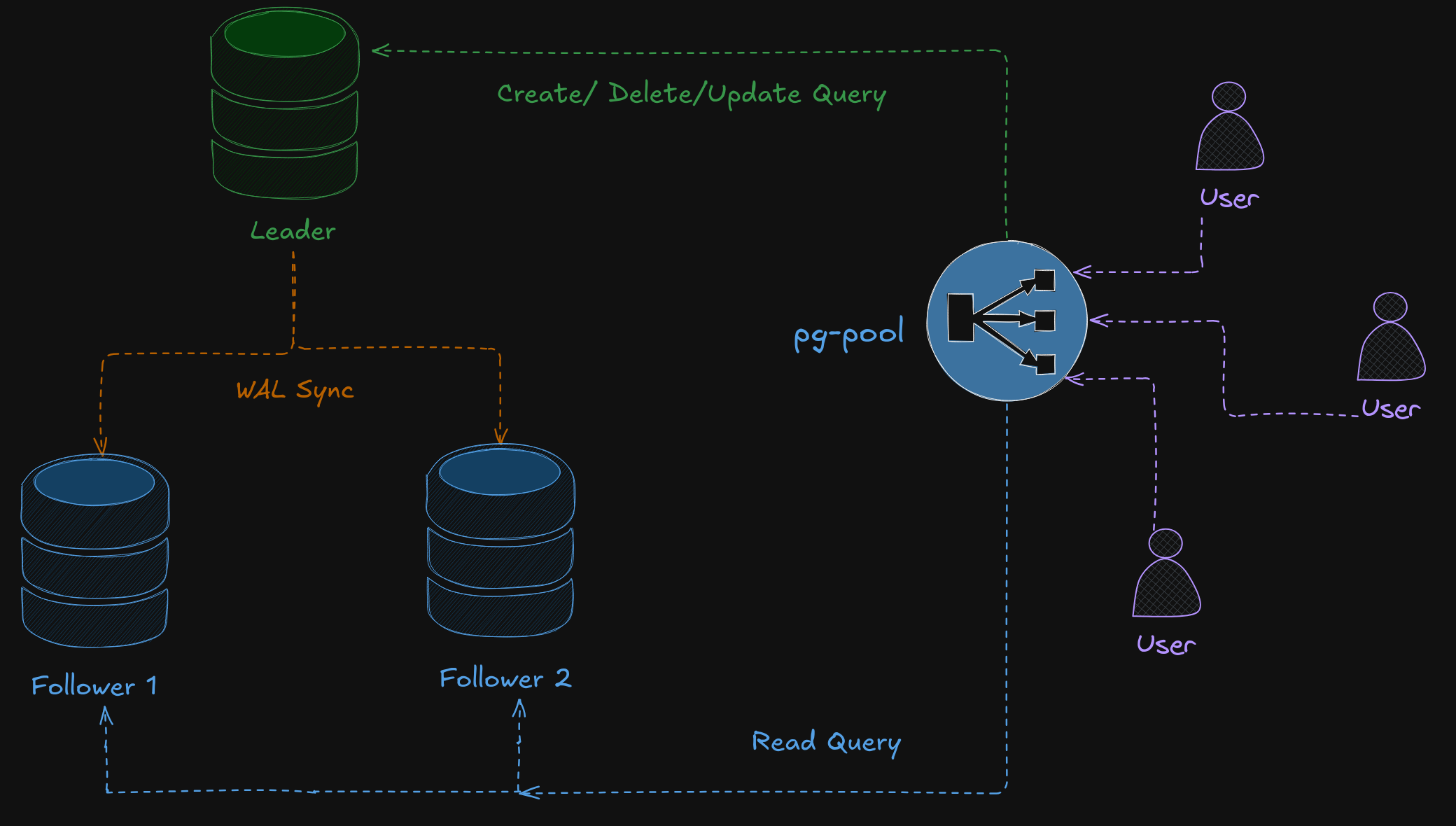
In this architecture, a connection pooler / proxy like
pgpool-IIacts as a load balancer: it distributes read queries evenly among replicas and routes write transactions directly to the primary leader. The leader continuously streams its WAL (Write-Ahead Log) to the standby replicas.
Set Up StackGres and Enable Load Balancer
Enable MetalLB on Minikube and start the tunnel:
minikube addons enable metallb
minikube tunnel
Install the StackGres Operator using Helm:
helm install stackgres-operator stackgres-charts/stackgres-operator \
    --namespace stackgres-operator \
    --create-namespace
Define Cluster Custom Resource
Create a file named replication.yaml:
apiVersion: stackgres.io/v1
kind: SGCluster
metadata:
  name: cluster

spec:
  instances: 3 # 1 primary + 2 replicas

  postgres:
    version: "15"

  pods:
    persistentVolume:
      size: "1Gi"

  profile: development

  postgresServices:
    primary:
      type: LoadBalancer
    replicas:
      type: LoadBalancer
Deploy the Cluster
Apply the configuration and watch the pods initialize:
kubectl apply -f ./replication.yaml
kubectl get pods -w
Retrieve Database Credentials
Fetch the generated superuser password:
PG_PASSWORD=$(kubectl -n default get secret cluster --template '{{ printf "%s" (index .data "superuser-password" | base64decode) }}')
echo "The superuser password is: $PG_PASSWORD"
Inspect Cluster Status and Roles
Check which node is the elected leader using patronictl:
kubectl exec -it cluster-0 -c patroni -- patronictl list Simulate Failover (Kill the Primary)
Delete the active primary pod to trigger an automated failover:
kubectl delete pod cluster-0Verify Leader Election
Check cluster status again. Patroni will have automatically elected a new primary among the remaining replicas:
kubectl exec -it cluster-1 -c patroni -- patronictl listWrite Data to the New Primary
Execute writes against the new leader:
PRIMARY=$(kubectl exec -it cluster-1 -c patroni -- patronictl list | grep Leader | awk '{print $2}')
kubectl exec -it $PRIMARY -c patroni -- psql -U postgres -c "CREATE TABLE replication_test_table (id SERIAL PRIMARY KEY, data TEXT);"
kubectl exec -it $PRIMARY -c patroni -- psql -U postgres -c "INSERT INTO replication_test_table (data) VALUES ('Spread the word about PostgreSQL high availability!');"
Verify Replication Across Replicas
Query the other pods to confirm that the new record has replicated:
kubectl exec -it cluster-0 -c patroni -- psql -U postgres -c "SELECT * FROM replication_test_table;"
kubectl exec -it cluster-1 -c patroni -- psql -U postgres -c "SELECT * FROM replication_test_table;"
kubectl exec -it cluster-2 -c patroni -- psql -U postgres -c "SELECT * FROM replication_test_table;"
As you can see, data replication is nearly instantaneous. StackGres uses Patroni under the hood to handle consensus, health checks, and automatic failovers seamlessly.
Partitioning
Table partitioning splits large tables into smaller, distinct physical storage units within a single database instance. PostgreSQL supports table partitioning natively via DDL. Partitioning improves query performance (via partition pruning) and speeds up bulk data purging. It is ideal for time-series data, audit logs, and region-based datasets.
Types of Partitioning
-
Range Partitioning: Data is mapped based on continuous ranges (e.g., date intervals, numerical ranges).
-
List Partitioning: Data is grouped explicitly by distinct keys (e.g., countries, departments, statuses).
-
Hash Partitioning: Data is distributed deterministically across partitions using a modulus hash function (e.g.,
MOD(customer_id, 2)).
The following SQL demonstrates hierarchical partitioning: the parent orders table is partitioned by year (range), then by region (list), and finally by customer ID (hash):
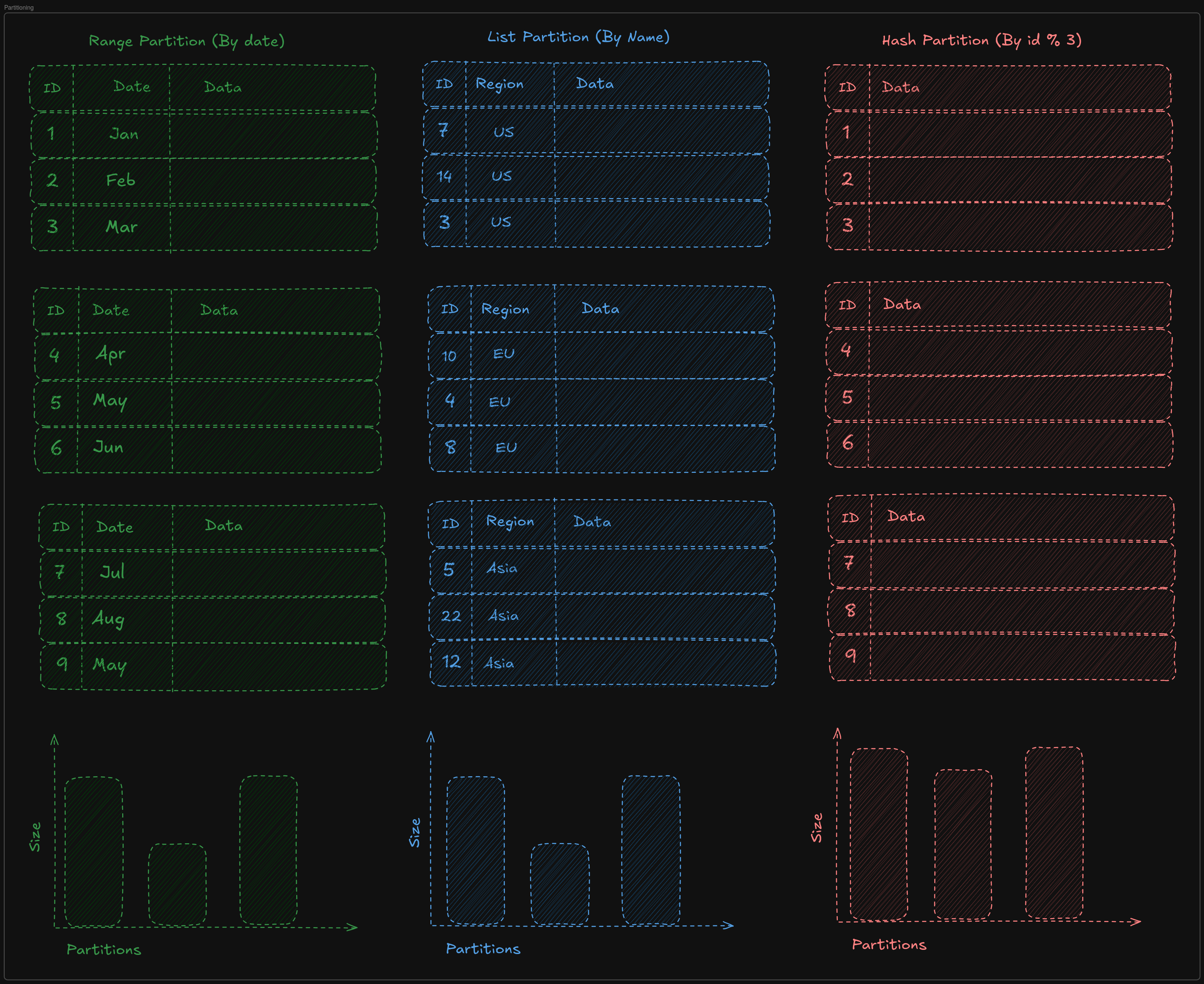
Note: Hash partitioning guarantees that data is evenly balanced across partitions, preventing hotspotting.
Connect to the Database
Connect via an SQL client such as pgAdmin or psql using:
postgresql://postgres:<password>@localhost:5432
Create Hierarchical Partitions
-- Parent table
CREATE TABLE orders (
    order_id    INT,
    customer_id INT,
    order_date  DATE,
    region      TEXT,
    amount      INT,
    PRIMARY KEY (order_id, order_date, region, customer_id)
) PARTITION BY RANGE (order_date);

-- Range partitions: Year 2024 & 2025
CREATE TABLE orders_2024 PARTITION OF orders
    FOR VALUES FROM ('2024-01-01') TO ('2025-01-01')
    PARTITION BY LIST (region);

CREATE TABLE orders_2025 PARTITION OF orders
    FOR VALUES FROM ('2025-01-01') TO ('2026-01-01')
    PARTITION BY LIST (region);

-- List partitions: US & EU regions for 2024
CREATE TABLE orders_2024_us PARTITION OF orders_2024
    FOR VALUES IN ('US')
    PARTITION BY HASH (customer_id);

CREATE TABLE orders_2024_eu PARTITION OF orders_2024
    FOR VALUES IN ('EU')
    PARTITION BY HASH (customer_id);

-- Hash sub-partitions
CREATE TABLE orders_2024_us_0 PARTITION OF orders_2024_us FOR VALUES WITH (MODULUS 2, REMAINDER 0);
CREATE TABLE orders_2024_us_1 PARTITION OF orders_2024_us FOR VALUES WITH (MODULUS 2, REMAINDER 1);

CREATE TABLE orders_2024_eu_0 PARTITION OF orders_2024_eu FOR VALUES WITH (MODULUS 2, REMAINDER 0);
CREATE TABLE orders_2024_eu_1 PARTITION OF orders_2024_eu FOR VALUES WITH (MODULUS 2, REMAINDER 1);
Insert Sample Data and Query
-- Generate 1,000 synthetic orders
INSERT INTO orders (order_id, customer_id, order_date, region, amount)
SELECT
    1000 + floor(random() * 9000)::int AS order_id,
    1000 + floor(random() * 9000)::int AS customer_id,
    DATE '2024-01-01' + (floor(random() * 366)::int * INTERVAL '1 day') AS order_date,
    (ARRAY['US', 'EU'])[1 + floor(random() * 2)::int] AS region,
    10 + floor(random() * 990)::int AS amount
FROM
generate_series(1, 1000) AS i;SELECT * FROM orders
WHERE order_date = '2024-06-10'
AND region = 'US';Application queries only need to target the parent
orderstable—PostgreSQL's query planner automatically routes queries to the exact matching partition (partition pruning).
Sharding with Citus
Sharding distributes table rows horizontally across multiple independent database worker nodes (shards). Query coordination, distributed joins, and aggregation are managed transparently by coordinator nodes.
Types of Sharding
-
Row-Based Sharding (Horizontal): Rows of a large table are split across multiple worker nodes using a distributed distribution column (e.g.,
user_idortenant_id). Both read and write throughput scale linearly as you add worker nodes. -
Schema-Based / Domain Sharding (Vertical): Entire domain models or related microservice tables (e.g., Auth vs. Billing) are housed in separate databases or worker nodes.
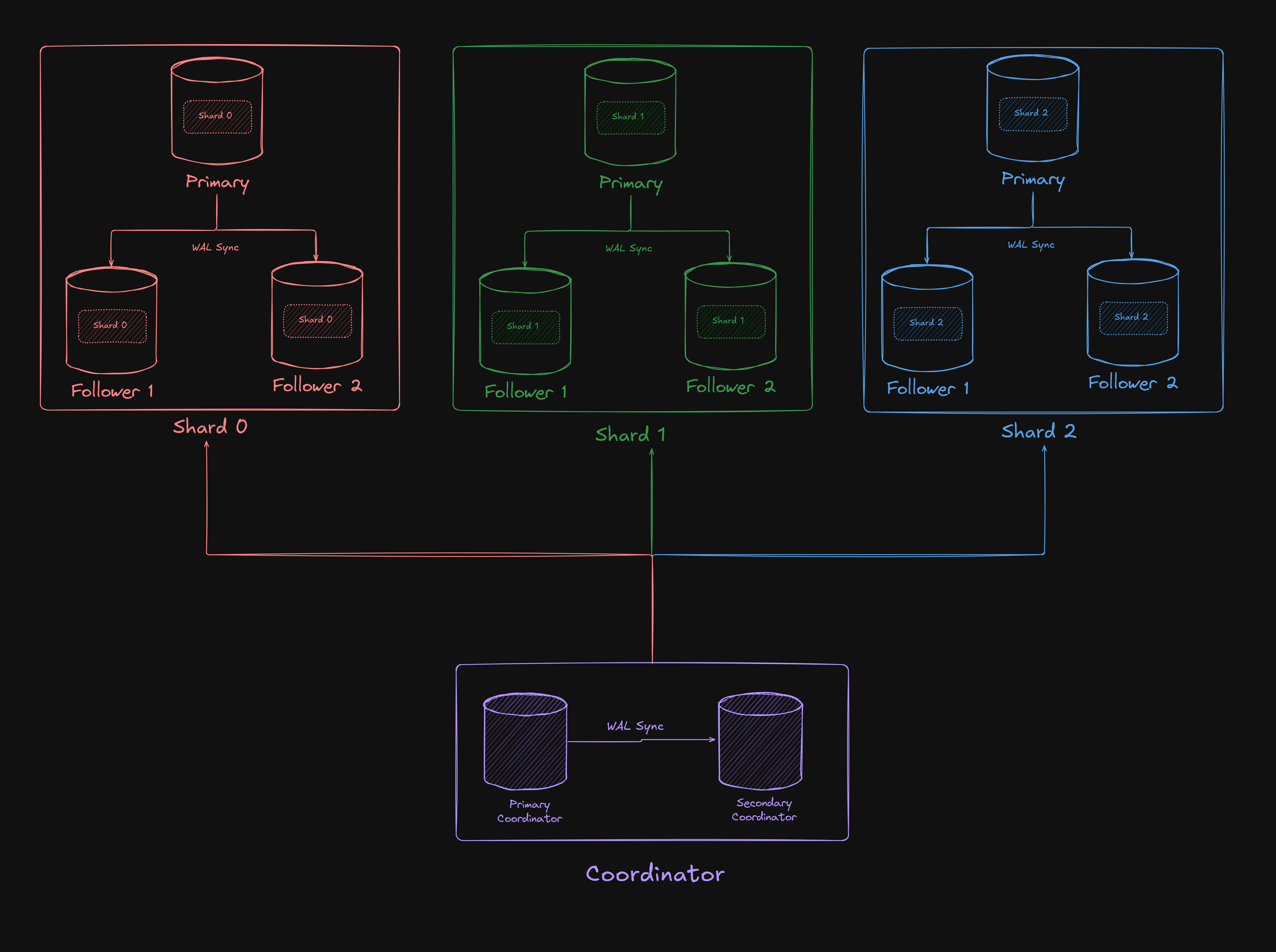
In this architecture, both the coordinator and worker shards are configured with standby replicas. The cluster remains fully operational even if individual worker pods or nodes encounter failures.
Define Custom Resource for Sharded Citus Cluster
Create shard.yaml:
apiVersion: stackgres.io/v1alpha1
kind: SGShardedCluster
metadata:
  name: cluster
spec:
  type: citus
  database: mydatabase
  postgres:
    version: 'latest'
  coordinator:
    instances: 2 # Number of coordinator instances
    pods:
      persistentVolume:
        size: '1Gi'
  shards:
    clusters: 3 # Number of shards
    instancesPerCluster: 3 # 1 primary and 2 replicas per shard
    pods:
      persistentVolume:
        size: '1Gi'
  postgresServices:
    coordinator:
      primary:
        type: LoadBalancer

  profile: development
Apply Citus Configuration
kubectl apply -f ./shard.yamlRetrieve Credentials and Connect
PG_PASSWORD=$(kubectl -n default get secret cluster --template '{{ printf "%s" (index .data "superuser-password" | base64decode) }}')
echo "The superuser password is: $PG_PASSWORD"
Connect to the coordinator endpoint:
postgresql://postgres:<password>@localhost:5432
Create Distributed Tables
-- Create and distribute users table
CREATE TABLE users (
    id BIGINT PRIMARY KEY,
    name TEXT
);
SELECT create_distributed_table('users', 'id');

-- Create and distribute orders table (co-located by user_id)
CREATE TABLE orders (
    id BIGINT,
    user_id BIGINT,
    product_id BIGINT,
    amount INTEGER,
    PRIMARY KEY (user_id, id)
);
SELECT create_distributed_table('orders', 'user_id');

-- Create reference table (replicated to all worker nodes)
CREATE TABLE products (
    id BIGINT PRIMARY KEY,
    name TEXT,
    price NUMERIC
);
SELECT create_reference_table('products');
Insert Sample Data
INSERT INTO users (id, name) VALUES
(1, 'Alice'),
(2, 'Bob'),
(3, 'Charlie');

INSERT INTO orders (id, user_id, product_id, amount) VALUES
(1, 1, 1, 2),
(2, 1, 2, 3),
(3, 2, 1, 1),
(4, 3, 3, 5);

INSERT INTO products (id, name, price) VALUES
(1, 'Product A', 10.00),
(2, 'Product B', 20.00),
(3, 'Product C', 30.00);
Inspect Shard Distribution
View the distributed shard placements generated by Citus:
SELECT * FROM citus_shards
WHERE table_name = 'orders'::regclass;
Find Which Node Hosts Which Shard
SELECT
  s.shardid,
  n.nodename,
  n.nodeport
FROM pg_dist_shard s
JOIN pg_dist_shard_placement p ON s.shardid = p.shardid
JOIN pg_dist_node n ON p.nodename = n.nodename
WHERE s.logicalrelid = 'orders'::regclass;
Find Which Shard Holds a Specific Row
SELECT get_shard_id_for_distribution_column('orders', 1);Co-located Distributed Joins
SELECT
    o.id AS order_id,
    u.name AS customer,
    o.amount
FROM orders o
JOIN users u ON o.user_id = u.id;
Because orders and users are sharded on matching keys (user_id and id), Citus executes joins locally on each worker node without costly cross-network data shuffling.
Distributed-to-Reference Table Joins
SELECT
    o.id AS order_id,
    u.name AS customer,
    p.name AS product,
    o.amount
FROM orders o
JOIN users u ON o.user_id = u.id
JOIN products p ON o.product_id = p.id;
This join executes fast and efficiently because the products reference table is replicated across all worker nodes, allowing the join to occur locally.